 Toolnoza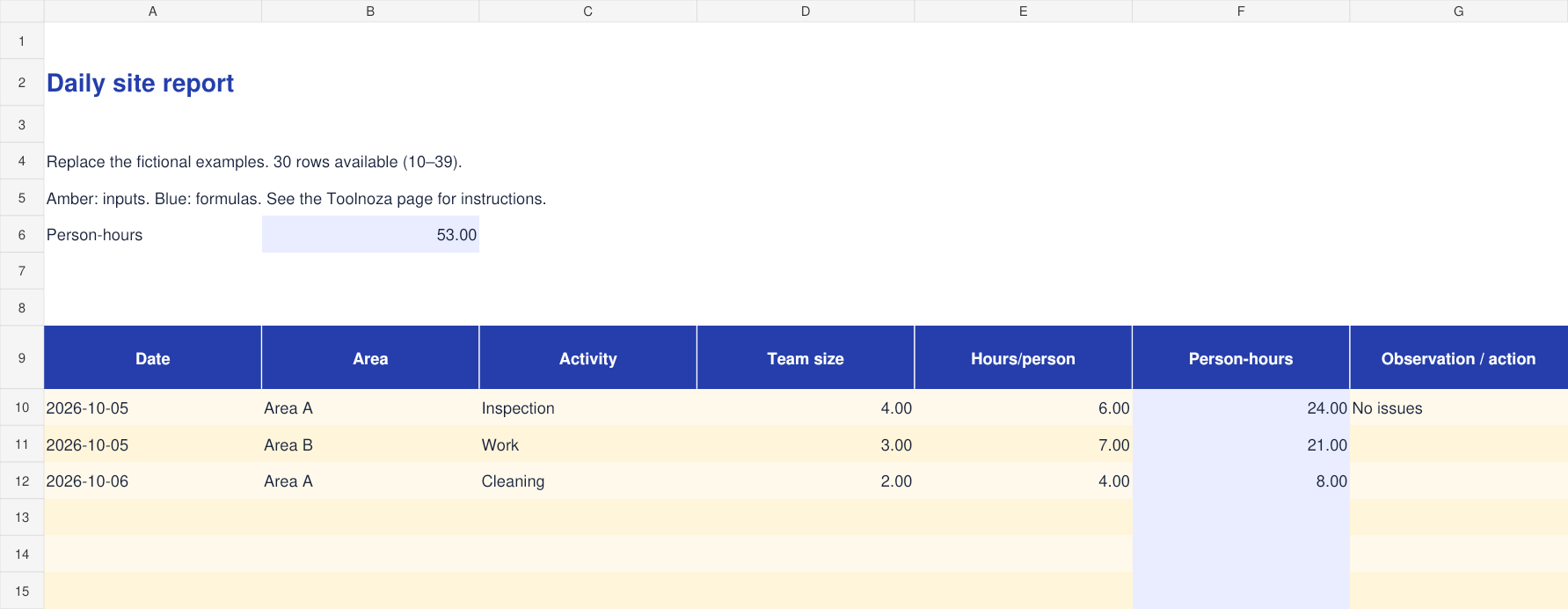
How to fill in the template
- Record the date, work area and a concise description of each activity.
- Enter the team size and hours worked per person. Split rows if individual hours differ.
- Person-hours multiply team size by hours per person. Add incidents, handover notes and next actions to the final column.
Calculations cover rows 10–39. To extend the file, copy the final row with its formulas and update total ranges.
Worked example
A team of 4 people working 6 hours each records 24 person-hours.
What to check
Person-hours measure labour effort, not elapsed duration. Keep sensitive incident details in your approved reporting system.
Included columns
- Date
- Area
- Activity
- Team size
- Hours/person
- Person-hours
- Observation / action
Frequently asked questions
Is the file free?
Yes. Download without an account or payment. You can edit the file for your personal or professional use.
How do I open it?
Open the .xlsx file in Excel or a spreadsheet app supporting this format. You can import it into Google Sheets; check formulas and formatting after import.
Is my data sent to Toolnoza?
No. You fill in the downloaded file in your own spreadsheet app.