 Toolnoza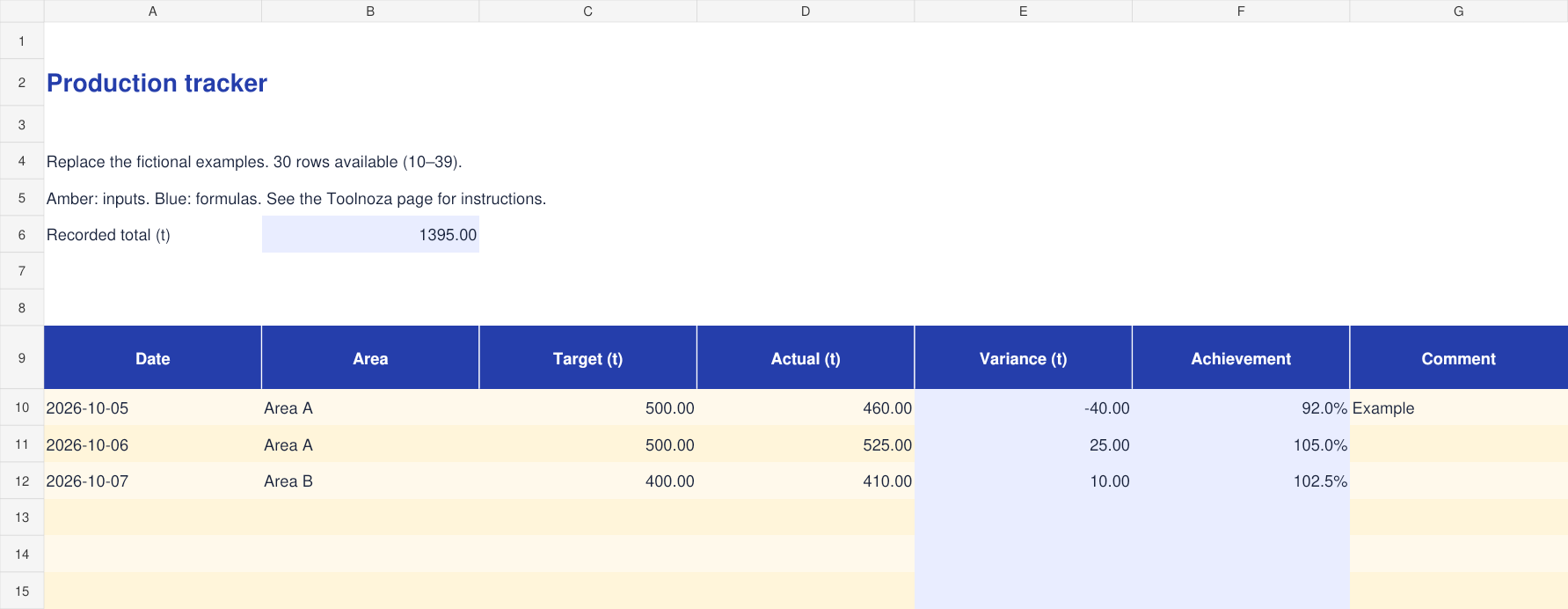
How to fill in the template
- Enter one row per date and area. Use tonnes consistently.
- Fill the target and actual output in the amber cells. Variance is actual minus target.
- Read achievement as actual divided by target. A zero target leaves the rate blank.
Calculations cover rows 10–39. To extend the file, copy the final row with its formulas and update total ranges.
Worked example
A target of 500 t and actual output of 460 t give −40 t and 92% achievement.
What to check
Use the same measurement basis for targets and actual output. Do not mix ore tonnes with total rock tonnes.
Included columns
- Date
- Area
- Target (t)
- Actual (t)
- Variance (t)
- Achievement
- Comment
Frequently asked questions
Is the file free?
Yes. Download without an account or payment. You can edit the file for your personal or professional use.
How do I open it?
Open the .xlsx file in Excel or a spreadsheet app supporting this format. You can import it into Google Sheets; check formulas and formatting after import.
Is my data sent to Toolnoza?
No. You fill in the downloaded file in your own spreadsheet app.